
River Video Studio
Edit, generate, restore — on the same timeline.
A non-destructive multi-track editor with generative AI baked into every clip. Upscale, denoise, extend, restyle, inpaint — all as one-click tools. Cloud or local. Multiplayer either way.
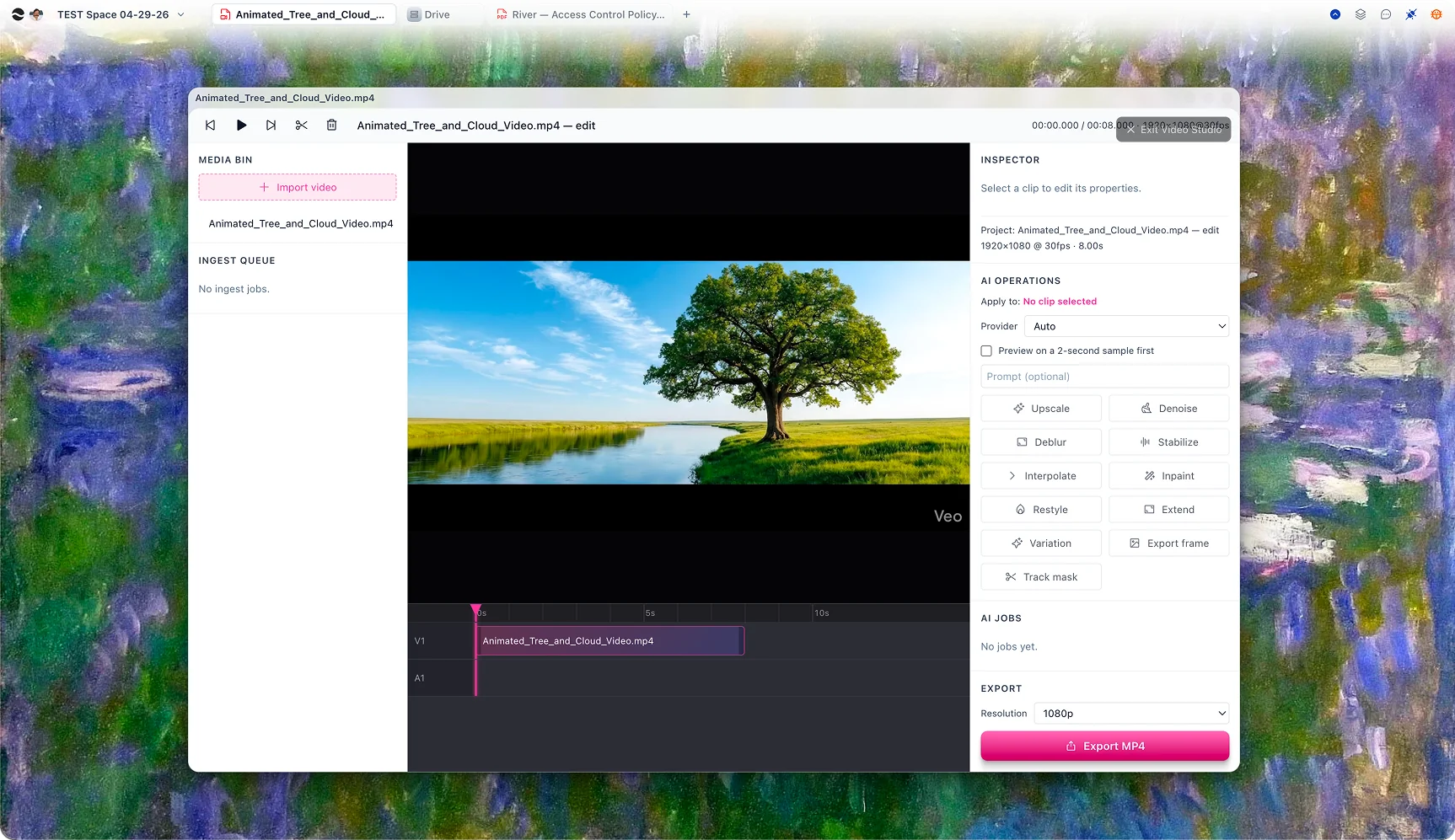
A real timeline. Multiplayer. Non-destructive.
Tracks for video, audio, text, and masks. Trim, split, slip, and ripple-edit with the precision you expect. The whole timeline is a CRDT, so two editors can work the same project at the same time — and so can an AI agent.
Generative ops on every clip.
Select a clip, pick a range, choose an operation. River dispatches the work to the right provider — Replicate, fal, Runway, Luma, Topaz, or your local engine — and drops the result back as a new clip on a new track. Originals are never touched.
Multi-GB uploads that just work.
Drop a 12 GB ProRes file. River streams it directly to S3 in chunks with concurrent connections. Pause it, close your laptop, open it three days later — it picks up where you left off. The backend never holds the bytes.
Agent-driven editing.
Ask a chat agent for a 60-second highlight reel of the keynote. It scans the transcript, finds the moments, assembles a cut, generates b-roll for the gaps, and adds lower-thirds — all into a real timeline you can review and adjust.
A real editor with real AI
Not a one-shot generator. An editor that happens to have models.
Every video model
Hunyuan, WAN, Runway, Luma, Topaz, fal — Video Studio routes per task without you switching tools.
Local when you want
When the desktop app is present, Video Studio uses your local engine for ops you don’t want sent to a cloud provider.
Honest progress
Live progress for every job. Real cost before you commit. Cancel in flight without getting double-charged.
For every kind of cut
Brand films, thesis defenses, family memories.
Marketing teams
Product demos. Customer testimonial cuts. Launch teasers. Social shorts. River turns raw footage into shippable cuts — with AI b-roll where you don’t have any.
Students
Final projects, thesis defenses, documentary cuts with AI-restored archival footage. Multiplayer means your group project doesn’t need "your turn" handoffs.
Personal
Wedding footage that doesn’t sit on a hard drive. A travel reel from phone clips. River turns "I should edit that someday" into "done by Sunday."
Questions
Replicate, fal.ai, Runway, Luma, and Topaz on the cloud side; Hunyuan, WAN, and other open-weight models locally. New providers slot into the same operation surface — you don’t learn five different UIs.
Multi-GB files work natively. Uploads go direct to S3 in chunks with resume-on-reconnect, so a 30 GB ProRes file survives a closed laptop or flaky wifi.
River generates a low-res proxy as soon as the first chunk lands. You’re scrubbing within seconds while full-quality processing continues in the background.
No. Generative ops always create a new clip on a new track. Hide it, delete it, swap providers and try again — the source layer is untouched.
Yes. The timeline is a CRDT document. Two people can edit the same project in real time without merge conflicts, and AI agents can act as a third "editor" with their own attribution.
H.264, H.265/HEVC, ProRes (Mac), VP9, and lossless intermediate. Export presets cover YouTube, Instagram, TikTok, broadcast deliverables, and offline mastering.
The video editor that understands what you’re cutting.
Drag in a clip, run your first generative op, and see why every editor we’ve shown this to has switched. Cloud is free; local mode is one click in the desktop app.